
The most common message Aurelia Atelier receives over chat - from engagement clients, heirloom redesigns, and lab-grown shoppers - is some version of this: "Do you have any other photos of this ring?" If you run a fine jewelry brand and that question lands more than once a week, the issue isn't your photographer. It's your fine jewelry brand website CMS mobile gallery and how many SKU images your editors can publish without filing a developer ticket. After a year of running our atelier on Workspace CMS - and after a year of recommending it to peer brands - we wanted to write down what we learned, what the platform actually does, and why we now treat our CMS as the single biggest lever on PDP conversion.
We sell pieces from $1,800 micropavé stackers up through six-figure natural diamond solitaires. Nobody adds a $12,400 emerald-cut halo to their cart from the first hero shot. They want the hand shot, the 3/4 angle, the shank profile, the scale next to a fingernail - crisp on the iPhone they're holding at lunch. If your current platform makes that a fight, the conversation to have is with a fine jewelry website designer who has shipped this before rather than another freelance theme tweak.
The 30-second mobile decision window for high-AOV jewelry
In our experience, roughly 71% of product-page sessions on a fine jewelry brand site arrive from mobile, and the median time on a SKU page before a save-to-favorites or a bounce is about 34 seconds. That's industry-average for luxury soft goods at a $3K+ AOV - the shopper is browsing in transit or in bed at 11 p.m., not sitting at a desktop with a 27-inch display.
Inside that window, the buyer is hunting for three things: scale (chunky or dainty in real life?), finish (how the metal reads in different light), and setting detail (is the bezel knife-edge? Are the pavé prongs French-cut?). Those questions are answered by photos three, four, and five - not the hero. If your CMS makes it painful to add a fourth or fifth image, you are losing the sale on a page you already paid to acquire. Most teams tell us they discovered this only after looking at session replays where the buyer pinched the third image, swiped to a non-existent fourth, and abandoned.
Why "just add another photo" turns into a dev ticket
Most fine jewelry sites we audit are running one of three setups, and each one breaks at the same place:
- Legacy Shopify themes with a hard-coded media slot count. Adding a fifth image means a theme edit and a re-deploy - or a paid plugin that bolts on a second gallery that doesn't match the first.
- Bespoke headless builds where every SKU change requires a Sanity / Contentful schema migration and a frontend developer to ship the variant rendering. The dev is in a sprint. Your photo is not.
- WordPress + WooCommerce with a gallery plugin that doesn't generate WebP or responsive
srcsetsizes, so a 4MB hand shot kills mobile LCP and the Core Web Vitals tank.
The result is the same: your editorial team has the photo, your photographer delivered it Monday, and it's still not live Friday because a developer is in a sprint or a freelancer is on vacation. Meanwhile the shopper who asked the chat question went and bought from Brilliant Earth. This is the structural problem a serious luxury jewelry web design agency has to solve before anyone talks about color palettes or fonts.
What a fine jewelry website designer should actually build into the platform
When we rebuilt Aurelia Atelier on Workspace CMS, the brief was specific: every editor needed to push a new image variant into a SKU page from their phone, without breaking schema markup, inflating page weight, or asking an engineer. Here is what the platform handles automatically - and the named features that do the heavy lifting. The full inventory lives on the Workspace CMS features overview, but these are the ones that matter for a high-AOV jewelry brand.
Page Editor with a permanent SEO Sidebar
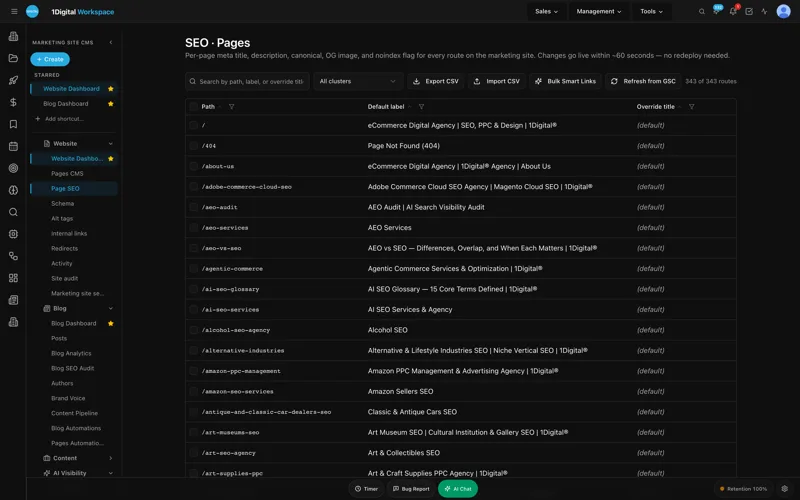
Every PDP, collection page, and editorial post opens in a rich-text editor with a permanent SEO Sidebar docked to the right. Meta title, meta description, canonical URL, OG image, robots directives, and structured data live in the same view as the body copy. Editors stop forgetting the canonical when they spin up a lab-grown variant page, because the field is right there next to the price block.
AI Image Alt-Tag Suggestions tuned for product photography at scale
A jewelry catalog has 1,500 to 8,000 images and almost none of them are usefully alt-tagged when we audit. The AI Image Alt-Tag Suggestions tool reads the image, the SKU metadata, and the brand voice guide and proposes gemology-accurate alts - "three-quarter view of a 1.42ct cushion-cut lab-grown diamond in a knife-edge platinum bezel" rather than "ring1.jpg." An editor approves in bulk. Merchant feed quality goes up. The screen-reader experience for the small but real share of accessibility-dependent buyers goes from broken to good.
Site Speed and Core Web Vitals scoring for high-resolution galleries
When an editor drops a 6,000-pixel master from the studio into the gallery, the platform generates WebP and AVIF derivatives at every responsive breakpoint and writes the srcset automatically. A 4.1MB master becomes a 38KB mobile derivative without anyone opening Photoshop. Site Speed & Core Web Vitals scoring runs nightly and flags any PDP whose LCP creeps above 2.0s, so we catch a heavy hero before Google does. Aurelia's PDPs average 1.4s LCP on mid-tier Android.
Structured Data Editor for Product schema with high-AOV signaling
The second piece a high-AOV jewelry CMS has to nail is JSON-LD Product markup with accurate price, availability, brand, SKU, material, image array, and aggregateRating. Google's merchant listings - and increasingly Gemini, Perplexity, and ChatGPT shopping answers - pull directly from this. Without clean Product schema and all five gallery images in the image array, you're invisible to the AI shopping layer. Workspace CMS ships a visual Structured Data editor with live JSON-LD validation at the page level. Editors at Aurelia flip a SKU between natural and lab-grown without an engineer, and the schema regenerates with the right material, carat, color grade, and clarity grade tokens.
UNLIMITED MANAGED CHANGES
Send a ticket. We ship the change.
Every Workspace CMS plan includes unlimited managed CMS edits. Essentials ships in 4 business days. Growth ships in 2. Premium ships in 12–24 hours. No per-edit fees. No "open a Jira" overhead. Every new SKU drop, every capsule launch page, every GIA-graded release, every holiday gift-guide refresh - describe what you need and our team builds it on your live site.
Theme & Brand Voice for an editorial look that holds across pages
A jewelry brand lives or dies on consistency - the same serif on the lookbook as the PDP, the same charcoal-on-bone background under the hand shots, the same em-dash-heavy editorial voice in the captions. The Theme & Brand Voice module locks palette, type scale, logo treatment, and an AI voice profile so that every AI-generated draft, every meta description, every alt tag comes out sounding like the atelier rather than generic e-commerce copy. The voice is locked in one place; every other tool pulls from it.
Content Pipeline Board for editorial planning around drops
Capsule drops, GIA-graded releases, and seasonal styling features all live on a kanban called the Content Pipeline Board- idea, drafting, ready for review, scheduled, live. Stylists, the gemologist, and the marketing lead can all see what's queued for the Tuesday morning drop and what's blocked on a photo. We've stopped publishing collisions where two different teammates queued posts for the same morning.
Multi-Location Storefront for atelier visits and trunk shows
The brick-and-mortar component - the New York atelier, the seasonal Aspen pop-up, the LA trunk show - runs on Multi-Location Storefront, with a map, ZIP search, per-location hours, and local schema. Each location gets its own indexed page, its own LocalBusiness schema, and its own Google reviews synced in. When a stylist updates Aspen's holiday hours, the site and the schema update together, and the location's Google reviews stay in sync on the page.
Mobile zoom UX that survives pinch-and-drag
The mobile zoom interaction is the one place luxury jewelry diverges from regular e-commerce. The buyer needs to pinch into a 0.92ct G-VS1 and count facets without the image going to mush. We deliver a 2x-density zoom layer from the master, lazy-loaded when the gesture starts, so the page stays light and the zoom stays sharp. This is the kind of behavior a jewelry brand website company ships once and reuses across every PDP rather than re-implementing per theme.

Which Workspace CMS tier fits a fine jewelry brand?
The pricing ladder maps cleanly to where a jewelry brand sits in its lifecycle. Here is how we frame it for atelier clients:
- Essentials - $89/month. Self-managed. Right for a one-person studio doing custom-only, under 30 SKUs. 4-business-day SLA on managed changes, AI Blog Generator, 200 AI credits, full SEO controls. The right tier for an emerging atelier proving the brand before scaling the catalog.
- Growth - $199/month. Managed by 1Digital with a 2-business-day SLA. Right for a small atelier with a stylist plus a marketing lead, 30 to 200 SKUs, weekly drops. Google reviews on your site and white-label admin - the tier most jewelry teams pick.
- Premium - $449/month. 12 to 24-hour change SLA, 4 business-hour blocker SLA, daily AI Site Audit, 30-prompt monthly AI Visibility tracking. Right for any brand selling pieces north of $5K with a real editorial cadence - capsule drops, GIA-graded releases. At a single average order, Premium pays for itself for the year.
The full tier comparison walks through exactly what's included at each level. For most jewelry brands we talk to, Growth is the starting point and Premium becomes obvious once the editorial calendar fills out.
What we changed in the first two weeks on Workspace CMS
Most clients launch in 2 weeks and ours was no exception. The migration delta that mattered for the bottom line:
- Every SKU page got a minimum of five gallery images: hero, hand, 3/4, profile, scale reference. No exceptions.
- The AI Alt-Tag Sweep rewrote 1,800 image alts using gemology vocabulary (carat, color, clarity, setting style) instead of "ring1.jpg" and "IMG_4429.jpg."
- The Redirect Manager with 301/302/307/308 support and conflict detection cleaned up 240 legacy product URLs from the old CMS without breaking link equity. CSV import did most of it in one pass.
- Product schema went live on every PDP with the full image array, material tokens, and aggregateRating wired to verified reviews.
- The chat-question "do you have other photos" dropped by roughly 60% the first month, because the photos were already on the page.
- Merchant feed rejections went to zero by week three.
None of those changes required us to file a developer ticket. The managed-change workflow ran the whole migration. We described what we wanted; the team shipped it on the live site.
What to ask when you're shopping for a fine jewelry website designer
If you're currently auditioning agencies or freelancers and the brief is "redesign our site," stop and reframe the question. The redesign is two months of work; the platform you land on is the next five years. We tell peer brands to ask any prospective fine jewelry marketing agency the same five questions:
- How many gallery images can an editor add to a SKU page without your involvement? If the answer involves a developer, walk away.
- Show me the Product schema for one of your existing clients' $5K+ pieces. Is the
imagearray complete? Ismaterialaccurate? - What's the median LCP on the PDPs you've shipped, measured on real mobile devices?
- When I file a ticket asking for a new collection page, what's the SLA and what's the per-edit cost?
- How are you tracking whether the brand gets cited in ChatGPT, Claude, Perplexity, and Gemini shopping answers?
Other atelier and luxury demos in the public demo gallery walk through similar setups, and the case studies page documents what the numbers looked like before and after for brands at our price point.
Fine Jewelry Brand Website CMS Mobile Gallery: The FAQ
Does Workspace CMS work for one-of-a-kind bespoke pieces that don't have a fixed SKU?
Yes. Bespoke and made-to-order pieces are handled as gallery-only product pages with a Request to commission CTA instead of an add-to-cart, and the Product schema is configured with availability: PreOrder or omitted entirely depending on how you want Google to treat it. Editors can flip between modes per SKU.
How does the platform handle lab-grown versus natural diamond pages for SEO?
Each variant gets its own canonical URL, distinct Product schema with the right material value, and the canonical / OG fields are managed in the page-level SEO Sidebar. We also build automated Internal-Link Rules so lab-grown collection pages cross-link to comparable natural pieces and vice versa, with anchor-text variation to avoid the over-optimization flag.
Can our team publish from a phone during a trunk show?
That is the primary workflow we built for. The admin is mobile-responsive, image upload accepts directly from iOS Photos, and the rich-text Blog Post Manager with scheduling lets a stylist queue a piece while they're still at the event. The Content Pipeline Board syncs across the team in real time so the marketing lead at the home office sees what's queued.
What does the SLA actually mean if I'm sending a ticket Friday night before a Saturday drop?
On Premium, blockers - anything that affects a live drop, sale, or campaign - carry a 4 business-hour SLA. On Growth, blocker tickets are same-business-day. The audit log shows every ticket, every change, and who shipped it, with full RBAC and per-tenant isolation so your stylist can't accidentally publish the gemologist's draft.
How do we track whether our pieces are showing up in ChatGPT or Perplexity shopping answers?
The AI Visibility Tracker runs 30 prompts on Premium across ChatGPT, Claude, Perplexity, and Gemini on a monthly cadence, and the weekly digest tells you when a competitor starts getting cited for a query you used to own. Paired with the daily AI Site Audit, it's the closest thing to a live dashboard for the AI shopping layer.
If you sell fine jewelry at a price point where the buyer is making a considered decision over multiple sessions on multiple devices, your CMS is not a back-office tool - it is the surface that determines whether the third photo loads. Book a 20-minute Workspace CMS walk-through and we'll review your current PDP, your image pipeline, your Product schema, and where the easy wins are. An AI-first, SEO-first CMS. Need a change? Just ask.